 SealReply
Mobile app
Don't lose customers when you step away from your desk
New chats reach your phone as push notifications, and one tap opens them. Out, off shift or at lunch, the people on your website still get an answer.
Scan with your phone. Works for iPhone and Android
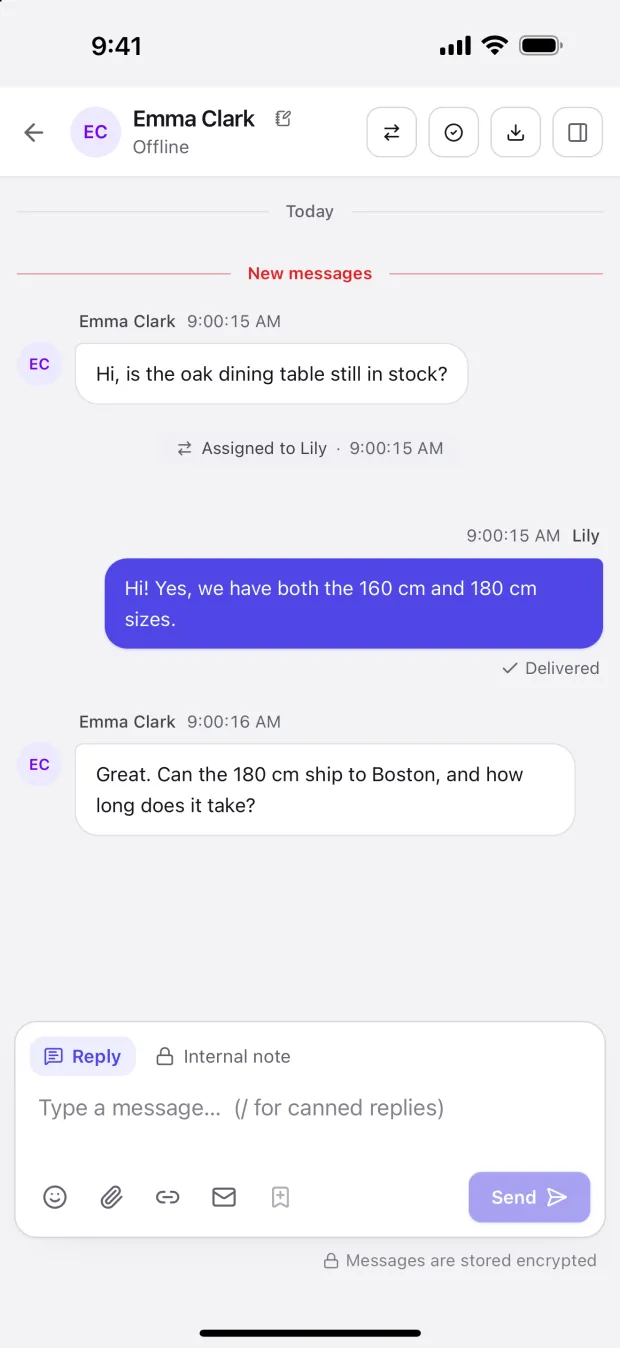
What you do at your desk, you can do on your phone
Your phone hears about a new message right away, even with the console closed and the phone locked.
When your status is Online, the app counts as online in the background, so visitors can chat straight away. Chats go to people at a computer first, and return to the queue if a visitor waits 5 minutes for a reply.
A notification opens its conversation, with the page the visitor is on, where they came from and past chats. You can send images and files too.
As in the console, read visitors' messages translated and send replies in their language.
One account: the same chats, leads and messages on phone and computer. The app picks up console updates by itself.
A notification only says which site it came from, never what the visitor wrote.
iPhone: from the App Store
Search for SealReply on the App Store or scan the code above. It is available everywhere except mainland China. With an Apple ID from there, use one from another region, or open the console in your phone's browser.
Read the full install guide →Android: from this website
- Open the file when it has downloaded. If your phone warns about unknown sources, allow your browser to install apps.
- Open the app, sign in with your console account and allow notifications.
- Follow the app's prompt to lift battery restrictions and allow auto-start, or your phone may stop delivering messages soon after it locks.
FAQ
About the mobile app
Does the app cost anything?
No. It is a free download: sign in with your console account. It does not use up a seat.
Which phones does it work on?
iPhone through the App Store; Android phones with the installer from this website.
My Apple ID is from mainland China. Can I install it?
The app is not on the mainland China App Store. Download it with an Apple ID from another region, switching only inside the App Store, with no need to leave iCloud. Or open the console in your phone's browser and get alerts there (iPhone needs iOS 16.4 or later and the page added to the home screen).
Is the Android installer safe? Why does my phone warn me?
It is published only on this website and signed with our own key, and the SHA-256 checksum is listed so you can check it. Phones warn about any app installed outside a store. Huawei and Honor's Pure Mode blocks it too: continue when prompted, or turn Pure Mode off for the install.
Why does Android always show "Receiving new messages"?
The installer does not rely on Google services and keeps its own connection for messages. Android requires a permanent, silent notification for that. If messages still go missing, check the battery and auto-start settings, and watch for email alerts.
Can my team use it?
Yes. Each member installs the app, signs in with their own account and gets their own alerts. Visitors and chats stay in the workspace, so changing phones loses nothing.
Start by adding chat to your website
Sign up and install the chat widget, then sign in on your phone with the same account to answer visitors from anywhere.